
Google is expected to roll out its Android 16 QPR3 beta update very soon, and if current timelines hold, Pixel users are just weeks away from receiving a meaningful upgrade. These Quarterly Platform Releases (QPRs) are not minor patches—they often bring a mix of feature enhancements, usability improvements, and subtle interface refinements that significantly impact the overall user experience.
Android 16 QPR3 beta , it’s clear that this update is focused on improving customization, usability, and everyday convenience rather than introducing radical changes. While the update may not look dramatic at first glance, many of its improvements address long-standing user requests and pain points.
So, what exactly is changing? Let’s take a deep dive into the six biggest features coming to Pixel devices with Android 16 QPR3.
A Quick Look at What Users Are Most Excited About
Before diving into each feature in detail, it’s interesting to look at what users are most excited about. Based on early feedback and polling trends:
- The ability to remove the “At a Glance” widget has generated the most interest
- Customizable navigation buttons are also highly anticipated
- Flashlight brightness control stands out as a practical everyday improvement
This shows that users are prioritizing customization and control over flashy features—something Google seems to understand well with this update.
1. Removable “At a Glance” Widget
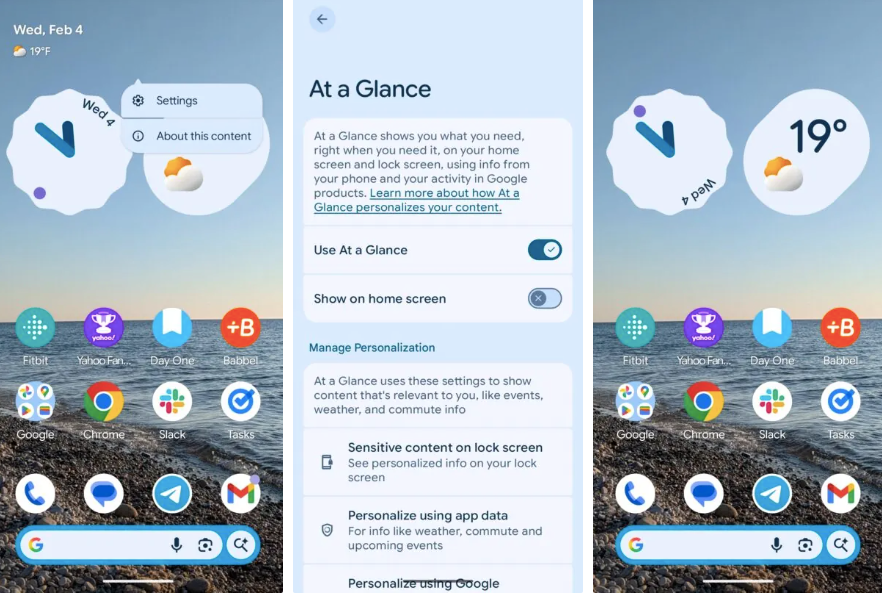
One of the most requested features by Pixel users is finally becoming a reality—the ability to remove the At a Glance widget from your home screen.
For years, this widget has been permanently placed at the top of the main home screen, displaying information like:
- Date
- Weather
- Calendar events
- Travel updates
While useful, it has also been a source of frustration for users who prefer a clean or fully customizable home screen layout.
With Android 16 QPR3, users can now remove it entirely. This is done by pressing and holding the widget, accessing its settings, and toggling off the option to display it on the home screen.
This change may seem small, but it has a big impact on customization. Users can now:
- Add more widgets
- Organize apps more freely
- Create a cleaner home screen layout
Importantly, the widget is not removed completely—it will still appear on the lock screen, ensuring that users who rely on its information don’t lose functionality entirely.
2. Adjustable Flashlight Brightness
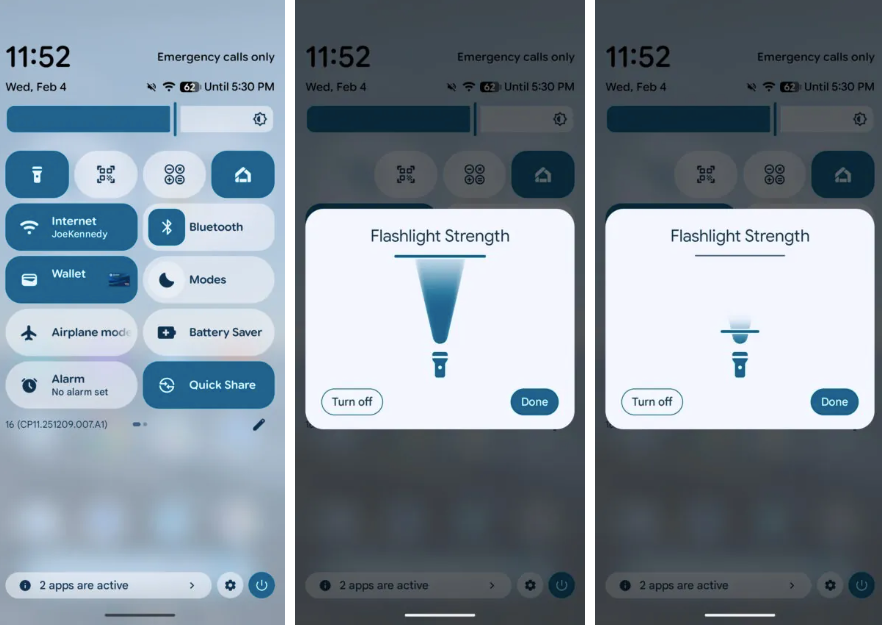
Another practical and widely appreciated addition in Android 16 QPR3 is adjustable flashlight brightness.
Until now, Pixel devices offered a simple on/off flashlight toggle. While functional, it lacked flexibility. This update changes that by introducing a brightness control slider.
Once the flashlight is turned on through Quick Settings, users can press and hold the flashlight icon to access a new brightness control panel. From there, they can adjust the intensity of the light based on their needs.
This feature is especially useful in real-world situations such as:
- Using low light at night without disturbing others
- Increasing brightness for outdoor visibility
- Conserving battery by using lower intensity
While this feature has existed on some other platforms, its addition to Pixel devices is a welcome improvement that enhances everyday usability.
3. Samsung-Style Navigation Buttons
Navigation preferences vary widely among users. While many have switched to gesture navigation, a significant number still rely on traditional navigation buttons.
Pixel phones have traditionally used a standard layout:
- Back button on the left
- Home button in the center
- Recents button on the right
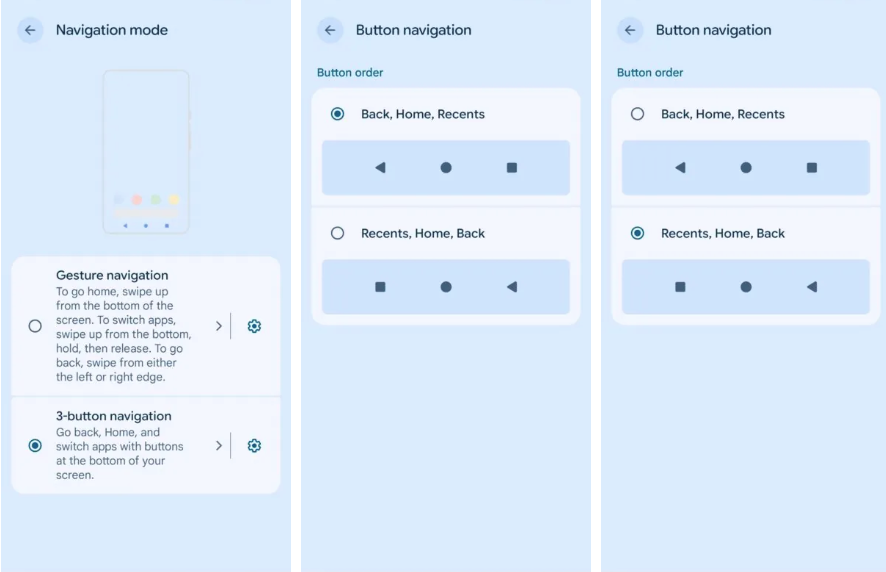
With Android 16 QPR3, Google introduces an alternative layout inspired by other Android devices. This new option swaps the position of the Back and Recents buttons.
This means users can now choose between:
- Default Pixel layout
- Alternative layout with reversed button positions
Although this may seem like a minor tweak, it can make a big difference for users transitioning from other devices. It provides familiarity and improves comfort, especially for long-time Android users who are used to different layouts.
The option can be enabled through the navigation settings menu, giving users greater control over how they interact with their device.
4. Revamped Adaptive Connectivity
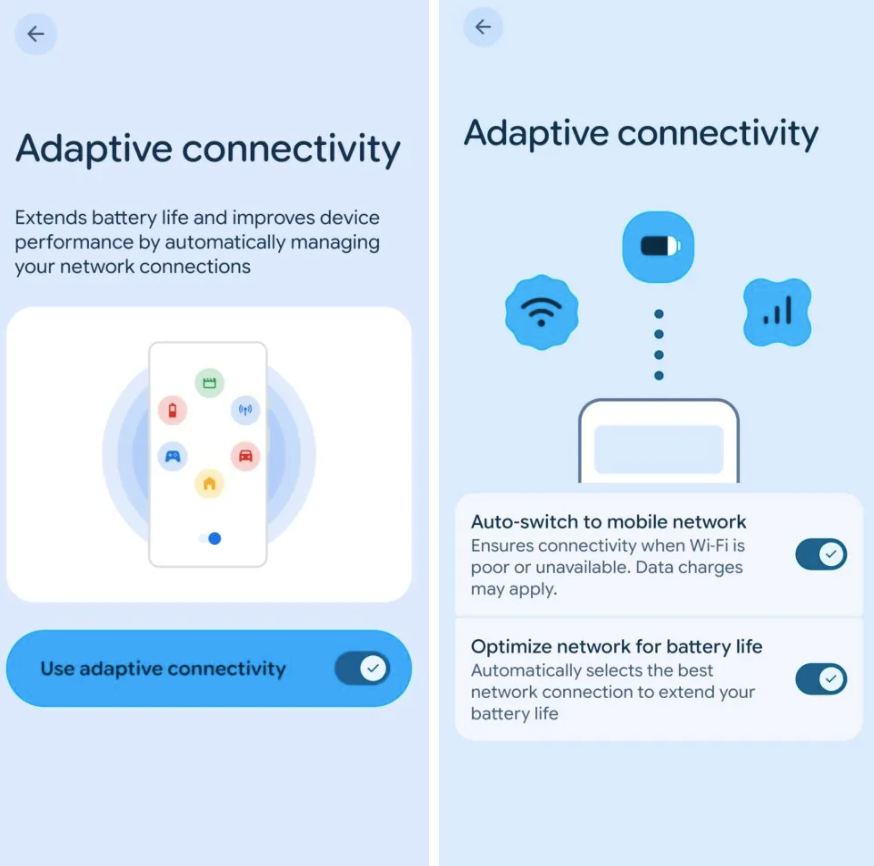
Adaptive Connectivity has been part of Pixel devices for several years, but until now, it has remained somewhat unclear in how it functions. It was previously controlled by a single toggle that claimed to optimize battery life and network performance.
Android 16 QPR3 significantly revamps how Adaptive Connectivity works,
Instead of one general toggle, Adaptive Connectivity is now divided into two distinct functions:
- Automatic switching to mobile data when Wi-Fi is weak
- Intelligent network selection to improve battery efficiency
This change makes the feature more transparent and user-friendly. Users can now understand exactly what each function does and control them independently.
In practical terms, this means:
- Better internet reliability in weak Wi-Fi areas
- Improved battery life through smarter network usage
- More control over connectivity behavior
This update transforms Adaptive Connectivity from a vague feature into a more functional and understandable tool.
5. Redesigned System Settings Page
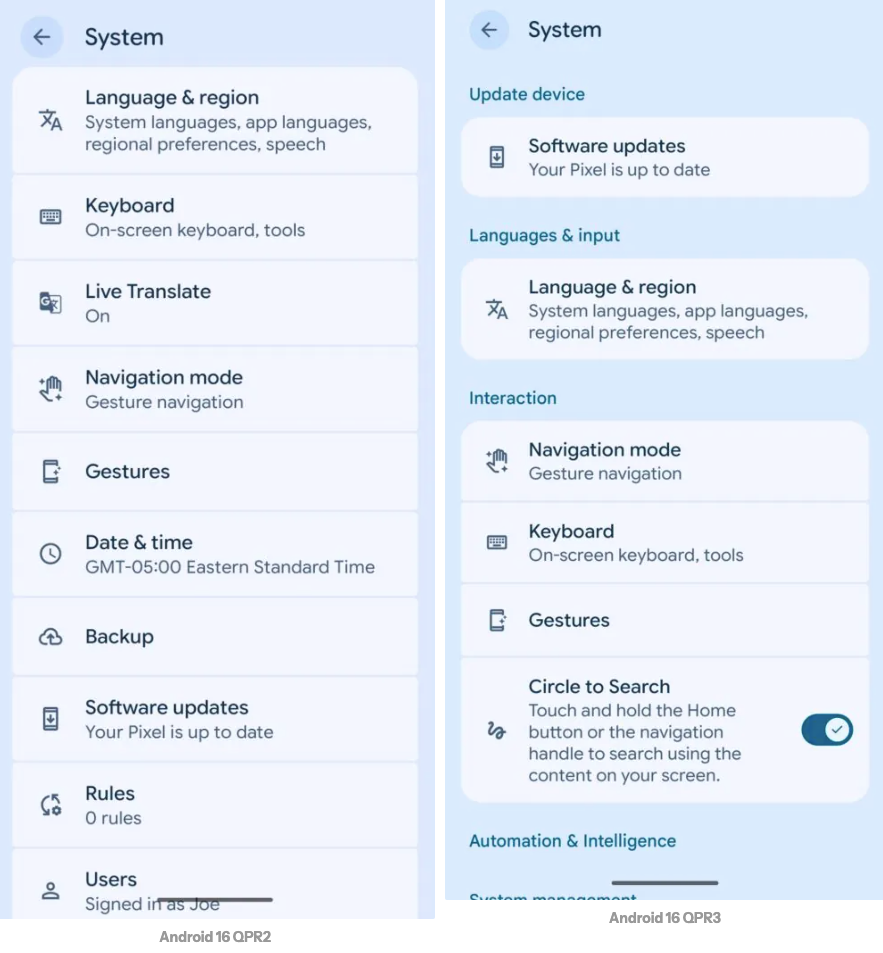
Another noticeable improvement in Android 16 QPR3 is the redesigned System Settings page.
In previous versions, the System section of the Settings app felt cluttered and poorly organized. Important options were often difficult to find, requiring users to scroll through a long list of items.
The new design introduces better categorization, grouping related settings together. For example:
- Software updates are now placed at the top
- Language and input settings are grouped logically
- Interaction and system controls are easier to locate
This redesign improves usability by making navigation faster and more intuitive. Users no longer need to search extensively to find important settings.
Although this change may appear subtle, it significantly enhances the overall user experience by simplifying how settings are accessed and managed.
6. Improved App Location Access Transparency
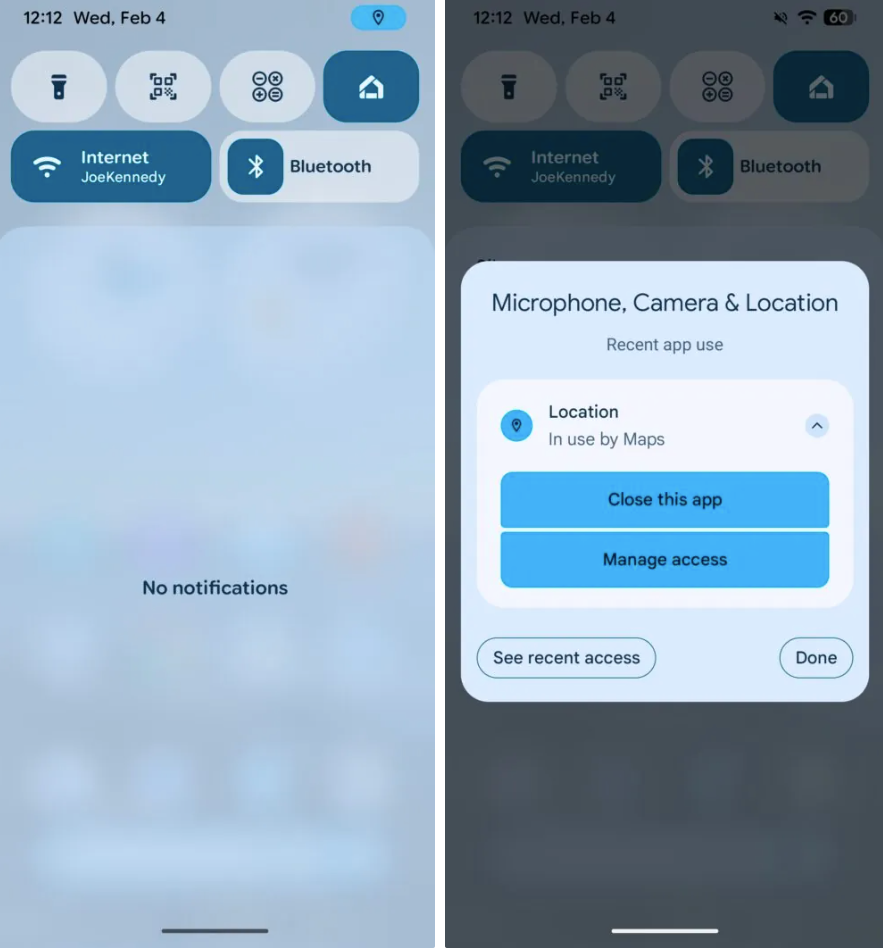
Privacy has become a major focus in modern smartphone software, and Android 16 QPR3 takes another step forward in this area.
The update introduces a more visible indicator when an app is accessing your location. A small blue dot appears in the status bar whenever location data is being used.
When users open the notification panel, this indicator expands into a more detailed view, showing:
- Which app is using location access
- Options to stop the app
- Controls to adjust permissions
This improvement makes it easier for users to monitor app behavior in real time.
Instead of navigating through multiple settings menus, users can quickly:
- Identify apps using location data
- Take immediate action if needed
- Maintain better control over privacy
This change reflects Google’s ongoing commitment to transparency and user control.
Real-World Impact of the Update
While each feature may seem small on its own, together they create a noticeable improvement in the overall Pixel experience.
The update focuses on:
- Customization (removable widgets, navigation options)
- Practical usability (flashlight brightness)
- Performance and efficiency (adaptive connectivity)
- Simplicity (settings redesign)
- Privacy (location access indicators)
These changes are designed to enhance everyday usage rather than introduce complexity.
Conclusion
Android 16 QPR3 may not be the most visually dramatic update, but it is one of the most user-focused. By addressing long-standing requests and refining existing features, Google is making Pixel devices more flexible, intuitive, and efficient.
From removing the “At a Glance” widget to improving privacy controls and adding practical features like adjustable flashlight brightness, this update delivers meaningful improvements that users will notice in daily use.
For Pixel users, Android 16 QPR3 represents a step forward in usability and personalization—proving that sometimes the best updates are the ones that quietly make everything better.
FAQ
1. When will Android 16 QPR3 be released?
The update is expected to roll out soon, likely within the next month, based on current timelines.
2. Which Pixel devices will receive this update?
Typically, recent Pixel models receive QPR updates, though exact device compatibility will be confirmed by Google.
3. Is this a major Android update?
QPR updates are not full version upgrades but still include important features, improvements, and fixes.
4. Can I remove the At a Glance widget completely?
You can remove it from the home screen, but it will still appear on the lock screen.
5. What is the most useful feature in this update?
This depends on user preference, but customization features and flashlight brightness control are among the most practical.
Smartphone Trends 2026: New Technology, Features & What to Expect
Most of us will happily spend an hour debating the best trainers or which streaming…

Best Bags & Handbags 2026: Stylish, Practical & Trendy Picks
The best bag styles of fall are anything but basic. The 2026 runways introduced fresh…

Navratri Dress Ideas 2026: Beautiful Chaniya Choli, Kurta & Ethnic Looks
Navratri is one of those festivals where fashion becomes part of the celebration. Nine nights…

Best Fashion Styling Tips 2026: Easy Ways to Look Stylish, Confident & Trendy
2026 fashion trends are all about a bold combination of personal expression, revived classics, and…

Best Flight Booking Tips 2026: Find Cheap Flights & Save Money
Ever panic-booked because you thought the price would rise in the next five minutes? Same….
Trending Now 2026: Top Viral Stories, Internet Trends & Social Media Buzz
July 2026 is packed with cultural triggers. The 4th of July brought back Jennifer Coolidge’s…